图片放大可以用很多插值方法,比如在html中指定img元素的width属性时,浏览器会自动对其进行插值放大。但一些时候我们需要自定义的插值放大方法,比如下面的链接演示了雷达回波图片的放大,采用了基本的最大邻域法来进行放大,这时需要我们自己来写算法。
先看演示:雷达回波图采用最大邻域法来进行放大
下面是主要的两个处理函数:
//获取图片像素信息
var getImagePixelData = function(img){
var canvas = $('
//获取图片像素信息
var getImagePixelData = function(img){
var canvas = $(' 图 1. 轮询和 WebSocket 实现方式的网络负载对比图[/caption]
客户端到服务端:
GET /demo HTTP/1.1
Host: example.com
Connection: Upgrade
Sec-WebSocket-Key2: 12998 5 Y3 1 .P00
Upgrade: WebSocket
Sec-WebSocket-Key1: 4@1 46546xW%0l 1 5
Origin: http://example.com
[8-byte security key]

服务端到客户端:
HTTP/1.1 101 WebSocket Protocol Handshake
Upgrade: WebSocket
Connection: Upgrade
WebSocket-Origin: http://example.com
WebSocket-Location: ws://example.com/demo
[16-byte hash response]
 [Constructor(in DOMString url, in optional DOMString protocol)]
 interface WebSocket {
   readonly attribute DOMString URL;
        // ready state
   const unsigned short CONNECTING = 0;
   const unsigned short OPEN = 1;
   const unsigned short CLOSED = 2;
   readonly attribute unsigned short readyState;
   readonly attribute unsigned long bufferedAmount;
   //networking
   attribute Function onopen;
   attribute Function onmessage;
   attribute Function onclose;
   boolean send(in DOMString data);
   void close();
 };
 WebSocket implements EventTarget;
 图 2. WebSocket JavaScript 接口[/caption]
 var wsServer = 'ws://localhost:8888/Demo';
var websocket = new WebSocket(wsServer);
websocket.onopen = function (evt) { onOpen(evt) };
websocket.onclose = function (evt) { onClose(evt) };
websocket.onmessage = function (evt) { onMessage(evt) };
websocket.onerror = function (evt) { onError(evt) };
function onOpen(evt) {
console.log("Connected to WebSocket server.");
}
function onClose(evt) {
console.log("Disconnected");
}
function onMessage(evt) {
console.log('Retrieved data from server: ' + evt.data);
}
function onError(evt) {
console.log('Error occured: ' + evt.data);
}
| 浏览器 | 支持情况 |
|---|---|
| Chrome | Supported in version 4+ |
| Firefox | Supported in version 4+ |
| Internet Explorer | Supported in version 10+ |
| Opera | Supported in version 10+ |
| Safari | Supported in version 5+ |
GET /demo HTTP/1.1
Host: example.com
Connection: Upgrade
Sec-WebSocket-Key2: 12998 5 Y3 1 .P00
Upgrade: WebSocket
Sec-WebSocket-Key1: 4@1 46546xW%0l 1 5
Origin: http://example.com
[8-byte security key]
   private byte[]   BuildServerPartialKey(string clientKey)
 {
      string partialServerKey = "";
     byte[] currentKey;
     int spacesNum = 0;
     char[] keyChars = clientKey.ToCharArray();
     foreach (char currentChar in keyChars)
     {
         if (char.IsDigit(currentChar)) partialServerKey += currentChar;
        if (char.IsWhiteSpace(currentChar)) spacesNum++;
     }
     try
     {
              currentKey = BitConverter.GetBytes((int)(Int64.Parse(partialServerKey)
 / spacesNum));
        if (BitConverter.IsLittleEndian) Array.Reverse(currentKey);
     }
     catch
     {
        if (currentKey!= null) Array.Clear(currentKey, 0, currentKey.Length);
     }
     return currentKey;
  }
private byte[] BuildCompleteServerKey(byte[] serverKey1, byte[] serverKey2,
 byte[] last8Bytes)
 {
     byte[] concatenatedKeys = new byte[16];
    Array.Copy(serverKey1, 0, concatenatedKeys, 0, 4);
    Array.Copy(serverKey2, 0, concatenatedKeys, 4, 4);
    Array.Copy(last8Bytes, 0, concatenatedKeys, 8, 8);
    System.Security.Cryptography.MD5 MD5Service =
 System.Security.Cryptography.MD5.Create();
   return MD5Service.ComputeHash(concatenatedKeys);
 }
 图 3. WebSocket 服务器刚启动的画面[/caption]
 图 4. 有客户端连接到 WebSocket 服务器的[/caption]
 图 5. 聊天室客户端初始页面[/caption]
 function ToggleConnectionClicked() {
if (SocketCreated && (ws.readyState == 0 || ws.readyState == 1)) {
ws.close();
} else {
Log("准备连接到聊天服务器 ...");
try {
ws =
new WebSocket("ws://" + document.getElementById("Connection").value);
SocketCreated = true;
} catch (ex) {
Log(ex, "ERROR");
return;
}
document.getElementById("ToggleConnection").innerHTML = "断开";
ws.onopen = WSonOpen;
ws.onmessage = WSonMessage;
ws.onclose = WSonClose;
ws.onerror = WSonError;
}
};
function WSonOpen() {
Log("连接已经建立。", "OK");
$("#SendDataContainer").show("slow");
};
function WSonMessage(event) {
Log(event.data);
};
function WSonClose() {
Log("连接关闭。", "ERROR");
document.getElementById("ToggleConnection").innerHTML = "连接";
$("#SendDataContainer").hide("slow");
};
function WSonError() {
Log("WebSocket错误。", "ERROR");
};
function SendDataClicked()
 {
            if (document.getElementById("DataToSend").value != "") {
                ws.send(document.getElementById("txtName").value + "说 :\"" +
document.getElementById("DataToSend").value + "\"");
                document.getElementById("DataToSend").value = "";
            }
        };
 图 6. 聊天客户端运行页面[/caption]
	dc.translate(300, 400);
	dc.scale(1,-1);
	dc.translate(300, 400);
	dc.scale(1,-1);
	dc.translate(-1000, -3000);
Google Maps JavaScript API v3 Example: Event Simple
src="http://maps.googleapis.com/maps/api/js?sensor=false">
absolute定位实验
absoluteAabsoluteBfloatCfloatD

.on() 和 .off() 分别用来绑定和解除事件。这两个函数可以取代之前版本中所有的事件处理函数。
$('a').bind('click', myHandler);
$('a').on('click', myHandler);

$('form').bind('submit', { val: 42 }, fn);
$('form').on('submit', { val: 42 }, fn);

$(window).unbind('scroll.myPlugin');
$(window).off('scroll.myPlugin');

$('.comment').delegate('a.add', 'click', addNew);
$('.comment').on('click', 'a.add', addNew);

$('.dialog').undelegate('a', 'click.myDlg');
$('.dialog').off('click.myDlg', 'a');

$('a').live('click', fn);
$(document).on('click', 'a', fn);

$('a').die('click');
$(document).off('click', 'a');
altKey, attrChange, attrName, bubbles, button, cancelable,
charCode, clientX, clientY, ctrlKey, currentTarget, data, detail,
eventPhase, fromElement, handler, keyCode, layerX, layerY,
 metaKey, newValue, offsetX, offsetY, originalTarget,
 pageX, pageY, prevValue, relatedNode, relatedTarget,
screenX, screenY, shiftKey, srcElement, target,
toElement, view, wheelDelta, which
    target
    relatedTarget
    pageX
    pageY
    which
    metaKey
$('body').on('drop',function(e){
	var file = e.originalEvent.dataTransfer.files[0];//获取一组拖放文件中的第一个文件

	reader = new FileReader();//创建FileReader对象来读取文件内容
	reader.onload = function(e){//读取完成时将内容显示于body中
		$('body').text(e.target.result);
	};
	reader.readAsText(file,'utf-8');//开始读取文件

	//相当于同时调用e.stopPropagation() 和 e.preventDefault()
	return false;//阻止事件冒泡和浏览器的默认行为
});
//假设后台发送的json数据为 '{a:2,b:1}' 存储于str中
var data = eval( '(' + str + ')' );
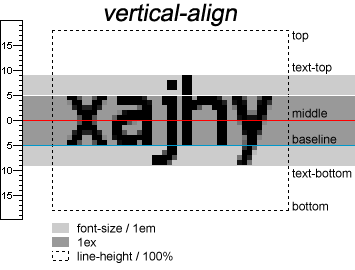 [/caption]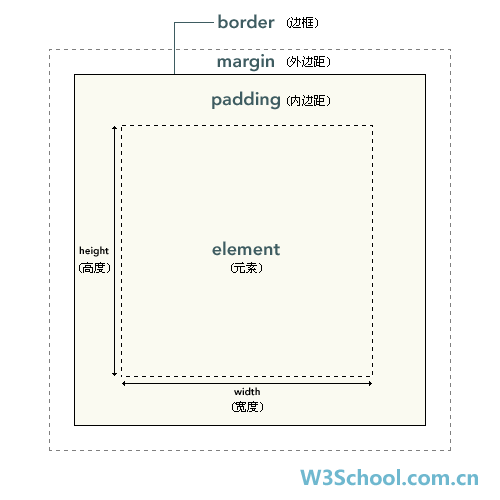

非替换元素
#创建数据库
CREATE DATABASE IF NOT EXISTS onlineWork;
USE onlineWork

/*
	创建表
*/
CREATE TABLE IF NOT EXISTS
czbEdit (
		postTime DATETIME NOT NULL PRIMARY KEY,
		forcastBegin DATETIME NOT NULL,
		forcastType ENUM('first','second','third','forth') NOT NULL,
		forcastJson TEXT NOT NULL,
		forcastText TEXT NOT NULL,
		editName VARCHAR(20) );
// 创建jQuery.height(size)  jQuery.width(size)
//调用each方法创建两个相似的函数
jQuery.each([ "Height", "Width" ], function( i, name ) {

	var type = name.toLowerCase();

	jQuery.fn[ type ] = function( size ) {

		var elem = this[0];
		if ( !elem ) {
			return size == null ? null : this;
		}

		if ( jQuery.isFunction( size ) ) {
			return this.each(function( i ) {
				var self = jQuery( this );
				self[ type ]( size.call( this, i, self[ type ]() ) );
			});
		}

		// 获取window对象的高度或宽度 ($(window).width() ) 实际上是当前可见区域的高度或宽度
		if ( jQuery.isWindow( elem ) ) {
			// Everyone else use document.documentElement or document.body depending on Quirks vs Standards mode
			// 3rd condition allows Nokia support, as it supports the docElem prop but not CSS1Compat
			// 以上英文的意思是依赖于Quirks 或 Standards 文档模式来使用
			// document.documentElement (实际上就是
| Property | Description | W3C |
|---|---|---|
| attributes[] | 获取一个元素的所有属性组成的数组 | Yes |
| childNodes[] | 获取一个元素的所有子节点组成的数组 | Yes |
| accessKey | 设置或获取一个元素的快捷键 | Yes |
| className | Sets or returns the class attribute of an element | Yes |
| clientHeight | Returns the viewable height of the content on a page (not including borders, margins, or scrollbars) | Yes |
| clientWidth | Returns the viewable width of the content on a page (not including borders, margins, or scrollbars) | Yes |
| dir | Sets or returns the text direction of an element | Yes |
| disabled | Sets or returns whether an element is disabled, or not | Yes |
| firstChild | Returns the first child of an element | Yes |
| height | 设置或获取元素的高度属性 | Yes |
| id | Sets or returns the id of an element | Yes |
| innerHTML | Sets or returns the HTML contents (+text) of an element | Yes |
| lang | Sets or returns the language code for an element | Yes |
| lastChild | 获取一个元素的最后一个子元素 | Yes |
| length | Yes | |
| nextSibling | 获取紧邻元素之后的元素 | Yes |
| nodeName | 获取元素的节点名称 (以大写方式) | Yes |
| nodeType | 获取元素的节点类型 | Yes |
| nodeValue | 获取元素的值 | Yes |
| offsetHeight | Returns the height of an element, including borders and padding if any, but not margins | No |
| offsetLeft | Returns the horizontal offset position of the current element relative to its offset container | Yes |
| offsetParent | Returns the offset container of an element | Yes |
| offsetTop | Returns the vertical offset position of the current element relative to its offset container | Yes |
| offsetWidth | 获取一个元素的宽度,包括补白和边框,不包括边界 | No |
| ownerDocument | 获取一个元素所属的根文档(Document对象) | Yes |
| parentNode | 获取一个元素的父节点 | Yes |
| previousSibling | 获取紧邻元素之前的元素 | Yes |
| scrollHeight | 获取元素的整体高度(包括滚动条) | Yes |
| scrollLeft | Returns the distance between the actual left edge of an element and its left edge currently in view | Yes |
| scrollTop | Returns the distance between the actual top edge of an element and its top edge currently in view | Yes |
| scrollWidth | 获取元素的整体宽度(包括滚动条) | Yes |
| style | 设置或获取元素的样式属性 | Yes |
| tabIndex | 设置或获取元素的TAB顺序 | Yes |
| tagName | 以大写字符串的方式获取元素的标签名 | Yes |
| title | 设置或获取元素的标题属性 | Yes |
| width | 设置或获取元素的宽度属性 | Yes |
| Method | Description | W3C |
|---|---|---|
| appendChild() | 在子元素列表后面增加一个新的元素 | Yes |
| blur() | 从一个元素上移除焦点 | Yes |
| click() | 在一个元素上执行点击操作 | Yes |
| cloneNode() | 复制元素 | Yes |
| focus() | 让一个元素成为焦点 | Yes |
| getAttribute() | Returns the value of an attribute | Yes |
| getElementsByTagName() | 根据指定的标签名获取所有元素 | Yes |
| hasChildNodes() | 返回一个元素是否有子元素 | Yes |
| insertBefore() | 在现存的子元素前插入一个新的子元素 | Yes |
| item() | 基于文档树的位置返回一个元素 | Yes |
| normalize() | Puts all text nodes underneath this element (including attributes) into a "normal" form where only structure (e.g., elements, comments, processing instructions, CDATA sections, and entity references) separates Text nodes, i.e., there are neither adjacent Text nodes nor empty Text nodes | Yes |
| removeAttribute() | 从元素中移除指定的属性 | Yes |
| removeChild() | 移除一个子元素 | Yes |
| replaceChild() | 替换一个子元素 | Yes |
| setAttribute() | 为元素增加新的属性 | Yes |
| toString() | 将一个元素转化为字符串 | Yes |
